Appendicitis! 3 năm trước mình vào viện vì nghi viêm ruột thừa nhưng cuối cùng không kết luận được http://truongan.name.vn/?p=729, năm nay lại thế, lại về nhà theo dõi :v
Category: Uncategorised
-
List of software I install on new box
firefox gimp libreoffice conky codeblocks ibus-unikey zsh dropbox g++ git skype vim sudo
-
Nginx and PHP-FPM can’t invoke g++
I ran into this weird problem when trying to get my sharif-judge fork running in laravel Homestead. Well it ran fine but when it invoke g++ to compile stuff I ended up with error
g++: error trying to exec 'cc1plus': execvp: No such file or directoryThe weirdest thing is that I can run g++ just fine from command line, error only arise when invoke g++ with shell_exec. A small test.php file with single line:
echo shell_exec("g++ code.cpp -fno-asm -Dasm=error -lm -O2 -w >/dev/null 2>error");has confirmed the problem.
2016 update: A fix has been found
A quick google around reveal many individual with similar problem but few answer and none successfully address the problem. When messing around I found that there was nothing wrong with my PHP settings, it turn out to be a environment problem. So I do a quick
printenvto get a list of every variable that was set when I invoke g++ from command line and compare it to the output whenn invoke by php-fpm. Then it was time to callputenvPHP function to set each of those variables.It turned out that the $PATH variable have to be set in order for g++ to execute, so putting
putenv('PATH=/usr/local/sbin:/usr/local/bin:/usr/sbin:/usr/bin:/sbin:/bin:/usr/games:/usr/local/games');before calling shell_exec easily fix the problem
-
Automated deploying using git.
Will write later, here is just the note:
https://www.digitalocean.com/community/tutorials/how-to-set-up-automatic-deployment-with-git-with-a-vps
http://grimoire.ca/git/stop-using-git-pull-to-deploy
http://gitolite.com/deploy.html
-
Using git over http with git-http-backend
This could be the third time I wrote a post like this. Editing apache configuration is ever so tricky to me that something would definitely go wrong somehow. After I successfully smoothed thing out, I would write a post and then sometime later, my blog went down and here I am again.
So to make the long story short, my colleagues and I have a project and a version control server. I don’t want to give my colleagues SSH key to the server since I store many other things on it, so I need another way to give them read and write access to the share git repo (with authentication of course).
To give access to git repo is easy. Git provide a CGI program called git-http-backend that will handle communication over the HTTP protocols, all we have to do is set some environments variable and alias apache to that CGI:
SetEnv GIT_PROJECT_ROOT /path/to/you/repo/parent/directory/

SetEnv GIT_HTTP_EXPORT_ALL

ScriptAlias /git/ /usr/lib/git-core/git-http-backend/
The first variable is the system path to the parent directory of your git repo. I don’t know much about the second variable, I found an explanation here but I don’t understand that explanation either, so we just leave it there
If you leave out
GIT_HTTP_EXPORT_ALLenvironment variable, then Git will only serve to unauthenticated clients the repositories with thegit-daemon-export-okfile in them, just like the Git daemon did.On some system, git-core is locate in /usr/libexec instead of just /usr/lib so watchout for that, apache won’t tell you if the path was wrong, make sure you get it right. The next part is authentication we can do it with this block:
<LocationMatch "^/git/.*/git-receive-pack$">

AuthType Basic

AuthName "Git Access"

AuthUserFile /path/to/your/.htpasswd

Require valid-user

</LocationMatch>
Authentication will be handle by apache, git-http-backend won’t handle it. The regex in LocationMatch tell git to require authentication only if client is accessing object negotiation for the push, not the pull. If you require authentication for both push and fetch, change the first line to
<LocationMatch "^/git/">. You will be required to create a .htpasswd file contain all the username and password. that file can using the program htpasswd:htpasswd .htpasswd abc
New password:
Re-type new password:
Updating password for user abcA guide I read suggest using htdigest but the .htpasswd for that file keep resulting in HTTP401 error so forget about it. When you are done with apache configuration, you can go create a bare repository on your server:
cd
/path/to/you/repo/parent/directory/repo.git

git init --bare

git config http.receivepack true
The last command is require to enable write access to your repository. Since the authentication is done by apace, git don’t get the username and it treat all push as anonymous, thus disable by defaults. If you don’t config it otherwise it will throw you a
Service not enabled: 'receive-pack'line in the error.logFinally you can push to your newly setup upstream by running this at your local computer:
git push –set-upstream http://your.domain.name/git/repo.git master
The red part in the command tell apache to handle it using git-http-backend and the blue part is your repository.
-
Install gimp in elementary os 0.3 cause dock (plank) to fail recognize launched app
Well this is strange and it drives me close to remove elementary os all together.
Last night I issue
apt install gimpthen go to sleep. The next day I woke up, everytime I launched an application from the dock (its name is plank) or from terminal, it won’t show up on dock but is represented by a new, ugly, low resolution icon on the dock. I tried to google to no avail until I decide to check my/var/log/apt/history.logand saw that the last package installed is gimp.
I quickly do
apt remove gimp && apt-get autoremoveto undo it and everything work normal again after log out. I still don’t know what caused the problem, at least I was noted that those are the packages removed along side with gimp:gimp-data libamd2.3.1 libbabl-0.1-0 libblas3 libcamd2.3.1 libccolamd2.8.0
libcholmod2.1.2 libgegl-0.2-0 libgfortran3 libgimp2.0 libilmbase6
libjavascriptcoregtk-1.0-0 liblapack3 libmng2 libopenexr6 libsdl1.2debian
libumfpack5.6.2 libwebkitgtk-1.0-0 libwebkitgtk-1.0-common -
My conky settings
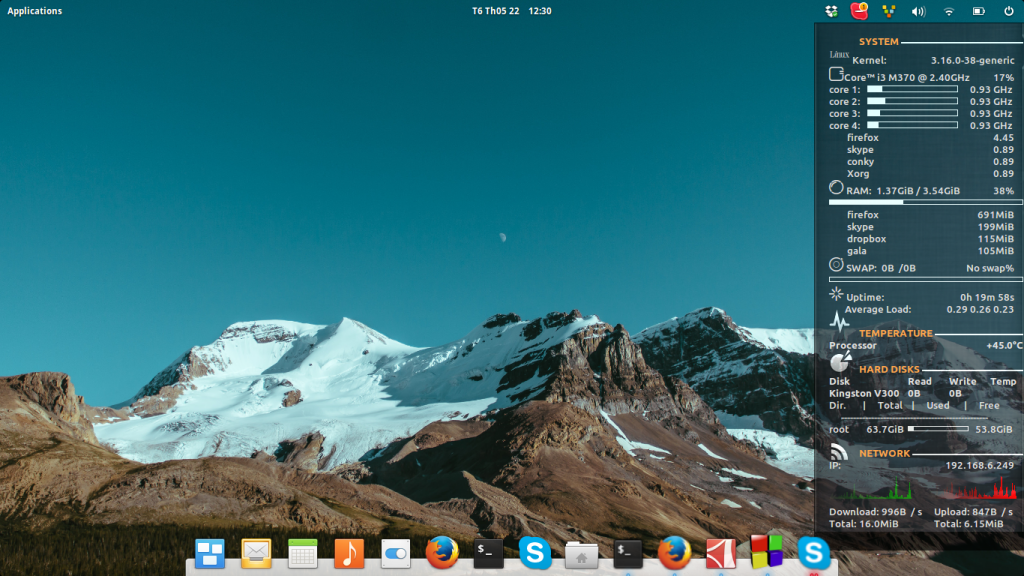
I figure it’s time to share my conky settings on blog as a backup mechanism in the event of my laptop becoming more and more unreliable as time goes by.
-
Elementary OS 0.3 freya with dropbox and ibus.
My first impression with freya beta 2 was not so good. I found no way to make dropbox display its systray icon and so does ibus. But this time, with a lot of people trying out freya, I was able to google some work around.
dropbox
First of all, dropbox should be start with this command:
env XDG_CURRENT_DESKTOP=Unity dropbox
So change the content of the file ~/.config/autostart/dropbox.desktop and replace the command was suffice.
For ibus, things is more tricky. I use ibus-unikey engine and the only way I found there is to display systray icon and switch input method by shortcut is done through gsettings and switchboard (system settings). ibus-setup has no power in those area whatsoever.
The shortcut key to switch keyboard layout is defaulted to be Alt + Space. If you don’t like it, go change it now in System settings > Keyboard > Shortcuts > Universal Access > “Next keyboard layout”. Go change it now because you will have to go throug hassle if you want to change it later.
To register ibus input method you have to the value of key:
org.gnome.desktop.input-sources.sources
using using gsettings or dconf-tools is your choice (the only choice you have).
This is my settings in dconf-editor. After this step, you can see a small icon idicator for your keyboard layout like this.

But you won’t be able to go to Text entry settings or the keyboard witch in System settings. switchboard will get segfault if you try to do so. The only to gain access back in keyboard settings is temprorarily restore the input-sources.sources key to default.
-
Alias Arial to another font.
Well, I have written about this before: http://truongan.name.vn/?p=706
But the file 30-metric-aliases.conf is system configuration and could be overwrite when we upgrade fontconfig. It turned out there is another much easier way to do this. The /etc/fonts/local.conf is meant to contain user settings, and Arial can be replaced with match edit. My whole local.conf file is:
<?xml version="1.0"?>
<!DOCTYPE fontconfig SYSTEM "fonts.dtd">
<fontconfig>
<!-- Font directory list -->

    <dir>/usr/share/fonts</dir>
    <dir>/media/data/fonts</dir>
    <dir>~/.fonts</dir>

<!--   -->

    <!-- Globally use embedded bitmaps in fonts like Calibri? -->
    <match target="font" >
        <edit name="embeddedbitmap" mode="assign">
            <bool>false</bool>
        </edit>
    </match>

    <match target="pattern" >
        <edit name="prefer_outline" mode="assign">
            <bool>true</bool>
        </edit>
    </match>

    <match target="font">
        <edit name="antialias" mode="assign">
            <bool>true</bool>
           </edit>
    </match>


    <!-- Make (some) monospace/coding TTF fonts render as bitmaps? -->
    <!-- courier new, andale mono, monaco, etc. -->
    <match target="pattern" >
        <edit name="bitmap_monospace" mode="assign">
            <bool>false</bool>
        </edit>
    </match>

    <!-- Force autohint always -->
    <!-- Useful for debugging and for free software purists -->
    <match target="font">
        <edit name="force_autohint" mode="assign">
            <bool>false</bool>
        </edit>
    </match>

<!-- -->

    <match target="font">

        <edit name="hinting" mode="assign">
                    <bool>true</bool>
            </edit>
        <match target="font">
    <edit name="autohint" mode="assign">
      <bool>true</bool>
    </edit>
  </match>
        <edit name="hintstyle" mode="assign">
              <const>hintslight</const>
        </edit>
    </match>
      <match target="font">
    <edit name="rgba" mode="assign">
      <const>rgb</const>
    </edit>
  </match>
    <match target="font">
        <test name="weight" compare="more">
            <const>medium</const>
        </test>
        <edit name="autohint" mode="assign">
            <bool>false</bool>
        </edit>
    </match>


    <match target="pattern">
        <test qual="any" name="family"><string>Arial</string></test>
        <edit name="family" mode="assign" binding="same"><string>Droid Sans</string></edit>
        </match>
</fontconfig>